Know exactly what your team is working on - without micromanaging.
Replace timesheets and guesswork with a single weekly AI report that tells you who's performing, who's stuck, and what to do about it.

“Replaced three tools with one Monday report. Now I know who needs support before it's a problem.”
- Sarah Chen, VP of Operations
“Managers stopped chasing timesheets and started having real performance conversations.”
- James Okafor, COO
“I was skeptical about privacy. But ScreenJournal doesn't feel like surveillance it feels like clarity.”
- Priya Sharma, Head of People
“The Monday report tells me exactly where to focus my 1-on-1s. No more dashboard digging.”
- Marcus Reid, Engineering Manager
“Finally, a tool that gives me visibility without making my team feel watched. Adoption was instant.”
- Elena Voss, Director of Ops
“Replaced three tools with one Monday report. Now I know who needs support before it's a problem.”
- Sarah Chen, VP of Operations
“Managers stopped chasing timesheets and started having real performance conversations.”
- James Okafor, COO
“I was skeptical about privacy. But ScreenJournal doesn't feel like surveillance it feels like clarity.”
- Priya Sharma, Head of People
“The Monday report tells me exactly where to focus my 1-on-1s. No more dashboard digging.”
- Marcus Reid, Engineering Manager
“Finally, a tool that gives me visibility without making my team feel watched. Adoption was instant.”
- Elena Voss, Director of Ops
“Replaced three tools with one Monday report. Now I know who needs support before it's a problem.”
- Sarah Chen, VP of Operations
“Managers stopped chasing timesheets and started having real performance conversations.”
- James Okafor, COO
“I was skeptical about privacy. But ScreenJournal doesn't feel like surveillance it feels like clarity.”
- Priya Sharma, Head of People
“The Monday report tells me exactly where to focus my 1-on-1s. No more dashboard digging.”
- Marcus Reid, Engineering Manager
“Finally, a tool that gives me visibility without making my team feel watched. Adoption was instant.”
- Elena Voss, Director of Ops
How It Works
Three steps. Zero dashboards. Total clarity.
Install
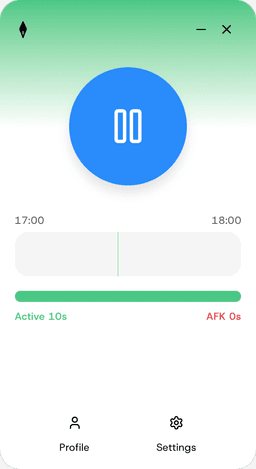
A lightweight tracker runs silently on employee machines. No setup friction, no workflow disruption.
AI Analyzes
Screen recordings, activity patterns, and sentiment are processed by AI - spotting what dashboards can't.
Get Insights
The part that mattersWeekly or monthly reports land in your inbox. Rankings, risks, action items - no dashboard required.
Ask ScreenJournal anything
Get instant answers about your team's productivity, work patterns, and time allocation. just by asking.
Team members

Alice
Doing greatAnalyst

Eric
At riskSales Representative

Ben
ReliableAccountant

Hazel
ReliableGraphic Designer

Chaz
Doing greatSoftware Developer

Grace
At riskCustomer Support Specialist

Danielle
ReliableHR Specialist

Fern
Needs coachingExecutive Assistant
Who left early most days last week?
Eric (Sales Representative) logged off before 4pm on 4 out of 5 days this week. His average end time was 3:42pm compared to the team average of 5:15pm.
Recommendation: Schedule a 1:1 to understand if there are external factors. Review workload and engagement levels.
How We're Different from Time Trackers
Manual timers or basic app/URL logging that employees can game
AI that monitors the screen & voice recording, sentiment, attendance and distractions for you
Multiple dashboards to check daily; raw data you must interpret yourself
No dashboard jungle, AI delivers weekly/monthly report with rankings, risks, and action items
Raw timesheets and charts-no real interpretation or recommendations
AI-generated insights: anomaly detection, sentiment analysis and action items
Complex project setup, training, and ongoing configuration
Register and we'll work with your IT team to get you set up
Simple, transparent pricing
Choose the plan that fits your team. Start with a free trial, no credit card required.
Basic
For teams getting started with workforce intelligence
- Screen activity analysis
- Voice analysis
- Basic productivity reports
- Email support
Enterprise
For organizations that need full intelligence capabilities
- Full screen and voice analysis
- Custom behavior pattern detection
- Advanced analytics and reporting
- Dedicated account manager
- Priority support
Frequently Asked Questions
Stop guessing. Start knowing.
Let AI turn screen data into clear insights. Start your 14-day free trial